Concise Object Preparer's Handbook
Table of Contents
- Overview
- Object Selection
- Object Organization
- Source Packaging
- Installation Scripting
- Object Test Inclusion
- Test and Script Validation
- Fault Localization
- Generating Fault-Matrices
1. Overview
This document describes the steps we follow to set up a subject of any programming language using the concise packaging format. It is written primarily as a set of instructions to persons who set up these objects, but it is also valuable as an aid to understanding the object setup, and choices made in that setup. Also be aware that some aspects of the preparation process vary depending on the types of analyses and experiments for which the object is expected to be of primary interest.
2. Object Selection
We recommend using the concise packaging format if your subject has the following properties:
- A large source code collection for each version
- Several versions of the subject are provided
The concise packaging format is intended to alleviate large download size issues with repository subjects. Our experience with providing subjects in the SIR indicates that a packaged subject using the directory structure form described in the Java object directory specification, or the C object directory specification having an aggregate size in excess of 500 Megabytes (MB) may experience difficulty downloading successfully. The concise packaging provides a way to use web URL references to provide versions of source code thus eliminating the need to provide them within the subject archive.
In general the Concise object packaging conforms to the Java Object Handbook recommendations. The only variance to this packaging is how the source code is supplied with a concise object.
Subjects in other languages, e.g. PHP, should follow the directory structure guidelines provided for Java. While the specification may refer to test specification methods that do not apply, you can reflect your test sources and required framework within that directory structure.
3. Object Organization
Selected objects are organized into a format that supports later experimentation. This is typical of all SIR subjects.
We have defined the general directory tree for concise subjects in the page:
Concise Object Directory Specification
This page describes the general layout of the object directory tree and URL link files for the two styles of source reference, link and giturl, current supported.
Read this specification file and look at existing concise objects for examples. You'll be starting by working in the "versions" area, then later in "inputs" and "testplans" and "scripts", as we get to later tasks.
Note: It is important that you set the
environment variable "experiment_root" before working with
any of the SIR objects. This variable should provide the absolute path to the
directory into which you have placed the SIR object directories. This enables
scripts and tools to resolve needed paths without hardcoding system
specific paths within the scripts.
4. Source Packaging
Packaging the source collections of concise testing objects is done in a different way than the traditional SIR subjects. With concise packaging the source collections of each version/variant are placed on web accessible hosting servers instead of directly within the verisions or versions.alt directory tree. Instead of providing the source collections, these directories contain web URL references to the web locations. Two styles of source code reference URLs are described here. The link style of URL reference utilizes the HTTP GET mechanism to download archives of source code collections from a web host. The giturl style of URL reference allows hosting a source code collection as a Git project. Refer to the Concise Object Directory Specification for more detail on URL specification.
4.1 Link Style Packaging of Concise Objects
For concise objects your source code needs to be packaged on a host server that allows download using the HTTP GET mechanism. This can be a private server that will be maintained in perpetuity, or a public server that allows users to upload source or archive files with owner control of content. Large File Storage (LFS) hosts like Github.com, Bitbucket.org, and gitlab.com provide owner control and may be suitable to contain your source archive collection. There may, however, be size limits on files that you need to adhere to.
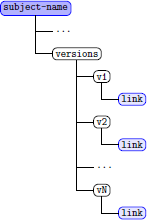
Once a hosting server location has been found, you will need to archive each version of the subject and upload these to the hosting server. Each version archive should be a complete archive of the necessary source files for the test subject. Any files that can be rebuilt on the end-user's system can be removed, thus reducing the size of the archive, provided you perform the rebuilding within your install script.
|
Once your source collections are stored as archives on the web hosting server the provisioning of the SIR object is very simple. For each version you have a source collection archive you create a directory named vN under the versions directory of the SIR directory tree, where N is the number of the version in sequential order starting from 1 (one). A subject with 10 versions would then have under the versions directory 10 subdirectories named v1 through v10. Within each of these directories you create a file named link that contains the URL needed to download the source collection archive from the web hosting server. An example, if your web hosting server is github.com, to download a copy of a source archive stored there in the your_user owner's project named test_object the direct link would be: https://github.com/your_user/test_object/blob/master/v1.zip You will need to gather the direct link address for each version and place that URL string into the link file under each version (vN) directory as depicted in Figure 1. The direct link address will vary depending upon the host server and the example shown here is how GitHub would present an archive file for direct download. Other hosting systems will differ so you will need to discover how each link is presented by your hosting server. Often this can be done using a browser and the "Copy Link Location/Address" feature. |
4.2 Git Style Packaging of Concise Subjects
The Git project style of packaging offers many benefits over the Link style. If your source code collection is already hosted on a Git version control system the effort to prepare the source code is minimal.
|
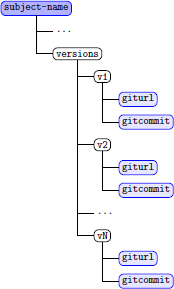
The Git project of your subject must be accessible to the public. The project must also contain all versions used in the original experiment. Each version must have a Git commit identifier (commit id) associated with it. Once you have the project and commit ids it is a simple matter to put these values into the SIR version tree as shown in Figure 2. For each version v1 though vN, the last version used in the original experiment, you place the Git clone URL into the giturl file of each version. Creating one copy of this file and then copying it into all version subdirectories is the easiest way to replicate this value across all versions. Next, you need to put the Git commit id for each version into the gitcommit file under each version subdirectory. If you have these listed in a single file it is easy to make a shell for-loop command line that takes each commit id line from the file and echo it into a gitcommit file within each version subdirectory. |
5. Installation Scripting
Installation scripting makes using concise packaged subjects easy for end users and is strongly encouraged. We have created a concise SIR package example subject, the Concise Example Package, that a subject preparer can use. This package contains shell functions and examples of installation scripts using the functions to download source code archives using the Link style of packaging and Git project packaging.
Within the installation scripts of this concise SIR package example subject the functions.sh file provides many standardized functions in addition to those used to download subjects. Also provided are functions to copy source code collection archives when the tradtional SIR packaging is used along with functions that can automate provisioning an SQL server on Linux systems. We recommend examining the functions.sh code to familiarize yourself with the way the functions provided operate and modify or add to them for your specific needs. Several subjects utilize the functions and add additional subject-specific functions in a second functions library file to streamline installation.
6. Object Test Inclusion
Including tests into an object is as important as packaging the sources and various testing mechanisms can be used. While some existing subjects in the SIR use TSL-based tests, others support code coverage-based tests, and JUnit tests. Tests supported may depend upon the object type, e.g. a web site object may have Selenium tests implemented using either the Selenium IDE (now deprecated) or Selenium WebDriver. What ever testing mechanism or framework your object you will need to either provide a copy of the framework within your testplans or testplans.alt directory tree or sufficent documentation with the README file for another researcher to obtain a compatible testing toolkit. Any custom tools you used should provide source code so users can build or port it on their system.
7. Test and Script Validation
After creating your package you should verify that the tests execute as expected against all the versions you are providing. You should also verify that all scripts provided work as intended and reset the values in your config.sh script to default values. Ensure that your README file(s) provide sufficient information to guide a user in how to set configuration values and that any configuration values are sufficiently documented so a user will understand what is being configured by that setting. A general guideline on how to perform test and script validation provided for Java subjects can be applied to most languages, that guidance is provided in the file:
Note that, as detailed in step 2 of these instructions, this may reveal sources of nondeterminism. These need to be made deterministic. We have some guidance on how to eliminate non-determinism from Java subjects in the file:
This may help you find ways to eliminate non-deterministic output for automated test result comparison. You may need to consult with the documentation of your test framework also if the recommendations we provide are insufficent or not applicable to your test suite.
8. Gathering final test histories and test timings
After performing all validation tasks for your tests and installation scripts, you may want to generate test histories and timings and specify an oracle for your tests. The oracle is important to users so they know what test results are expected. For some subjects the tests are expected to all pass on each version. You should document how your tests will behave for each version, or in a global document if all tests are expected to pass. This can be easily done in a README file if you have a particular test methodology, e.g. test evolution experiments run the previous version's test suite, in which case you can state which ones are expected to fail.
9. Fault Localization
If you have introduced or real faults in your source, you should document where these faults exist. This fault localization task helps users to create new tests and identify reasons for test failure. For existing subjects in the SIR we have recommendations that you can read which may help you in documenting the known faults and seeded faults in your subject. These existing recommendations are:
- Find Existing faults, as described in:
- Seed faults, as described in:
10. Generating Fault-Matrices
If seeded faults are provided in your subject you should generate a fault matrix indicating which seeded fault causes particular tests to fail. For Java subjects we provide this guidance:
For other languages the recommendations for Java may be useful in creating a fault matrix that users can refer to. The matrix format typical of other SIR subjects may be useful to you so you may want to review that format and choose how you want to relate your fault to test result information.