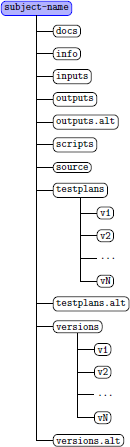
- source
An empty directory. During experiments, a version of the program
that you're working with is placed in here. For subjects that
employ public repositories using version control, e.g. Git or Mercurial
repositories, a copy of the repository is cloned into this location
and kept there for creating versions of the object via the
mechanisms provided by the repository, e.g. using the
"git checkout"
command to select the desired version. For
subjects using prepackaged versions stored as Zip files, the
contents of the source directory are deleted after
we're finished with it. The scripts provided with the object (see
the scripts subdirectory section below) are intended
to perform the download/clone action using the version
specific information provided within the versions directory
described below.
- versions.alt
May be used to contain variants/versions in lieu of using the versions
directory. If this directory is used, the installation scripts will
need to reference it instead of the versions directory, so
check what is being used by the install scripts. Either verisons.alt
or versions will contain subdirectories containing the web URL
links to the archive for the particular version, or the Git URL and
commit ID or specific tag needed to configure the subject from a
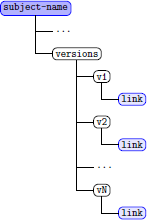
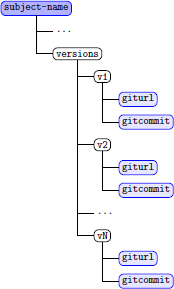
Git or Mercurial repository. Figures 2 and 3 graphically describe how the URL
files discussed below are provided within the directory layout of each
concise subject.
- versions
For Concise packaged subjects, the versions directory contains subdirectories in
the form:
v1,v2,v3,...vK
where v1 contains the first, earliest version, of a subject and v2 contains
the next newer version. Thus, vK version would contain the most recent version
expressing an evolutionary progression of the subject source. Each of these
subdirectories would contain a file or files describing the web resource
locations needed to obtain the source for that version. The files found
there will be named:
| File Name | Contents |
| link | A web URL for direct download of a source files archive (zip or tar.gz form) Multiple
URLs can be present in this file when the source file archive is available from multiple locations on
the web |
| giturl | A web URL in Git format for use by the git command to clone the repository
Multiple URLs can be placed in this file when the Git project is available from different Git repository
hosts on the web |
| gitcommit | The Git commit identifier number used to checkout the version of the object |
This is an extensible specification. The existing functions.sh
installation script library currently
supports HTTP GET source archive download and Git project source
clone operations. Additional
version control mechanisms, e.g. Mercurial or SVN, may be supported
in the future.
This is an example of the content of a link file.
https://git.unl.edu/Software_Artifact_Infrastructure_Repository/phpaddressbook/raw/master/v1.zip
This example references version 1 of the phpaddressbook subject from a repository
hosted on the git.unl.edu server. Note that the link file expects a
reference URL to be on a single line, but multiple URLs can be placed within it
separated by line-feed/new-line characters. In this example we hosted the
HTTP GET download
version from a Git server, but any hosting server that can support the HTTP GET
protocol can be used.
Specification of a Git project via the giturl and gitcommit files
is similarly simple. An example of the contents of a giturl file:
https://git.unl.edu/Software_Artifact_Infrastructure_Repository/MyMovieLibrary.git
https://github.com/ndbills/MyMovieLibrary.git
In this example we show two Git project links separated by line-feeds/new-lines.
This is how the giturl can be used.
to specify multiple locations to download the object source code. The gitcommit
file contains only one line that contains the Git commit identifer specific
to the version of source used for that version of the subject's original experiment.
An example contents of a gitcommit file would be:
ab3d1899150255f67b8c9bedc80e9ff6ae8795da6
This is a hash-value that uniquely defines the version within the Git project.
- testplans.alt
Testing information for objects.
Concise subjects may use this directory or the testplans directory
to store the tests applicable to the object. Typically these tests
are specific to the experiment performed by the original researcher
and are distinct from any tests packaged with the original source
obtained from the remote repository resource.
If used, this directory contains subdirectories v1, v1, ... vK, each
of which contains testing information for that version.
Further recommendations on how to use this directory are outlined
in the discussion on the testplans directory below.
- testplans
The testplans directory can be used instead of the testplans.alt
directory to contain tests specific to the original research performed
on the object. These tests typically are distinct from any tests
packaged with the object stored in the repository. The tests however
may augment the packaged tests as well. Usage of these tests should
be documented in a README and CONTENTS files so future users of the
tests will have guidance on how to use them in reproducing the
original experiments done on the object. Segmenting test suite
collections by version is recommended using subdirectories v1 to vK
as described in the versions directory section above.
- traces.alt
Currently this directory is unused, but it is provided to permit
researchers a location to hold any trace data they may wish to
provide or store that relates to the experiment execution.
If used, it is suggested that the data for each version be
stored in subdirectories, v1, v1, ... vK that correspond to
the version numbers used in the versions or versions.alt
directories described earlier.
- inputs
Files containing inputs or startup directories used by programs in various
tests. These could be grouped into subdirectories or distinguished by naming
conventions if helpful. Segmentation by version subdirectories may also
be used here allowing automated installation scripts to source the correct
input needed for particular tests or installations.
- outputs.alt
Provides a place to permanently store the outputs of test runs. This is
useful for regression testing where new outputs are compared
('diffed') against previous outputs.
This directory could contain subdirectories v1, v1, ... vK to differentiate
between versions.
- outputs
An empty directory, used during some experiments to hold test outputs.
- docs
Documentation about the object. Use any subdirectories that
are useful. Possibly, v1, v1, ... vK directories will help.
- originals
Original materials obtained on the objects. Subdirectories are used
if necessary (e.g. v1, v1, ... vK), and a CONTENTS file will describe
the purpose of the subdirectories.
- scripts
The directory from which experiments are run or installed. The
scripts provided here execute the download or clone operation from the
remote source code repository. The functions.sh script contains
functions that download the source code into the source directory
and for Git subjects apply the correct commit identifier to select the
version.
- info
Other information about the program, especially information gathered
by analysis tools and requiring saving for experiments. In particular,
we have found it useful to include subdirectories v1, ... vK and
"common" to store version-specific and object-specific information,
respectively.
The principle information to be found in the version-specific directories
is the fault matrix data, as follows:
Each vK subdirectory in info may contain fault matrix information for that
version. The fault matrices have the following naming convention:
- If a fault matrix file is generated from a single STImpL file
then it is named fault-matrix.<universe-file>. For example the
fault matrix file generated by running on the v1_1.tsl.universe
file will be named fault-matrix.v1_1.tsl.universe.
- If a fault matrix file is generated from the concatenation of two
or more STImpL files then it is named
fault-matrix.<universe-file-1>.<universe-file-2>.---.<universe-file-n>
where <universe-file-1> is the name of the 1st STImpL file
<universe-file-2> is the name of the 2nd STImpL file and
so on.
-
If a fault matrix is generated by ad-hoc or some other test
suite framework, you may want to overlay the expected results of the tests
onto a template similar to that used for
Fault Matrices. Using this format allows for automated
interpretation using the tools developed by the SIR. If you find
this template/format difficult you should define a structure
for your fault matrix that makes sense for the subject and
document that within the info directory path of the
subject. Again segment as needed into separate version-specific
fault matrix files to aid users in what tests are
affected by what faults.
Further information on fault matrices and file names is provided
in the main Java handbook.
- testdrivers
Contains test programs which make the application run.